Compass: Accurate Compass
- 4.5
- Rating
- 5.00M
- Installs
- Free
- Price
 Analysis by App-foxy
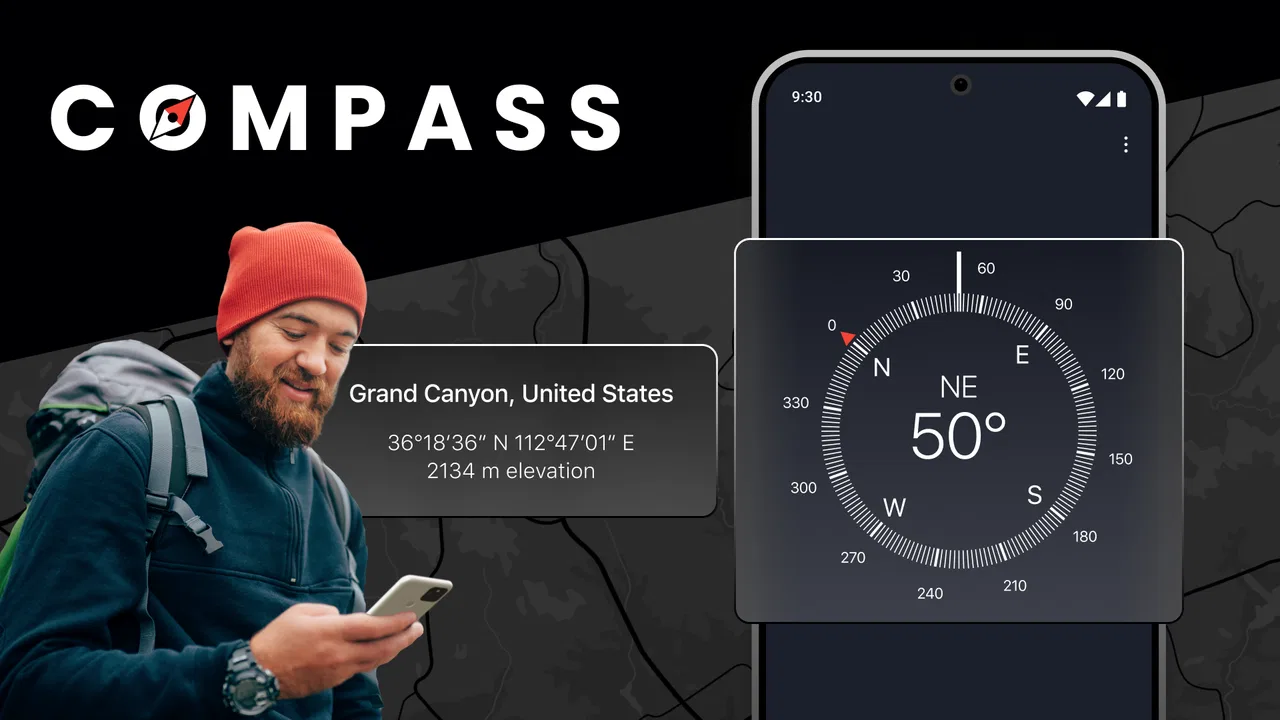
I like navigation tools that do one job clearly, and Compass: Accurate Compass follows that idea closely. It is a focused Android app from Prometheus Interactive LLC in the Maps & Navigation category, built for checking direction rather than replacing a full map service. In my experience, that narrow purpose is both its biggest strength and the main reason some people will find it unnecessary.
The app is free to install and suitable for Everyone, which makes it easy to try without committing to a subscription. Its store summary presents it as a precise digital compass and direction tool, and that description is a fair starting point: this is the kind of app I would open when I need to know which way I am facing, not when I need turn-by-turn driving instructions.
My main verdict is simple: Compass: Accurate Compass is useful when a clean directional reference is enough, but it should be treated as a companion to maps, not a replacement for them. That distinction matters. A map can show roads, trails, landmarks, traffic and destinations; a compass answers a more basic question—where am I pointing right now?
You May Also Like

 Blood Strike: 2.5 Anniversary
Blood Strike’s Loadouts Turn Every Drop Into a Tactical Gamble
A close look at Blood Strike’s custom loadouts: how fast access to signature weapons reshapes its battle royale rhythm, rewards preparation, and narrows the gap between fights.

 Pandora - Music & Podcasts
Pandora’s Music Is Easy to Start, but Harder to Recover
Pandora’s strength is its low-effort path from a seed to a station. Its weak spot is how much confidence it asks you to place in connection, setup, and quiet recovery.

 8 Ball Pool
 Is Built on Rivalries, Rematches, and Routine
A close look at the rivalries, rematches, shared routines, and unanswered safety questions that turn a quick pool match into a persistent mobile community.

 Samsung Music
’s Quiet Strength Is Playing What You Already Own
Its reach comes less from spectacle than from dependable access to a personal library. That simplicity is both the app’s strongest retention engine and its ceiling.

 AccuWeather: Weather Radar
AccuWeather Review: A Quick, Clear Forecast for Everyday Decisions
For everyday plans, the best forecast is the one you can understand quickly. AccuWeather makes rain timing, radar, and local conditions easy to act on, with a few trade-offs.

 Hill Climb Racing
Why Hill Climb Racing Still Turns Crashes Into One More Run
A tiny car, a bumpy hill and one more upgrade: Hill Climb Racing keeps resurfacing because its simple chaos makes every near-miss feel personal.
More From Our News Desk



What makes the compass useful in everyday navigation
The most convincing part of the experience is its immediacy. A dedicated compass app can be faster than opening a large navigation platform, waiting for a map to load and searching for a destination. If I am standing outside a building, looking at a trail sign or trying to orient myself before walking, a directional display is often all I need.
That makes it practical in situations where the route itself is already obvious. Imagine leaving a subway station in an unfamiliar neighborhood. I may know that the park is east of the station, but I do not yet know which way east is from the exit. Opening this app gives me a quick reference before I start walking. I can then use a map for the actual streets, while the compass helps me understand the surrounding layout.
The same workflow works when meeting someone in a large outdoor area. If a friend says they are waiting on the north side of a field, I can use the compass to establish orientation instead of guessing from the shape of nearby buildings. It is a small task, but this kind of quick confirmation is exactly where a compact direction tool earns its place.
I also appreciate that the app is not trying to bury its central purpose under a long list of unrelated functions. The store short description is simply “Compass,” and that directness matches the way I use it. I open it for orientation, check the reading, and close it. For occasional users, that low mental overhead is valuable.
There is another benefit that is easy to overlook: a compass changes how you read a map. Many people follow the blue location marker without understanding the landscape around them. Checking direction first can make a paper map, a trail map or a downloaded map area easier to interpret. I find this especially helpful when I want to choose a general heading before worrying about the exact route.
A better workflow than relying on the blue location dot
When I use a map app alone, I tend to stare at the screen and follow the suggested path. With a compass, I can first establish the broad direction, put the phone away, and use visible landmarks to stay oriented. That is a healthier approach for short walks because it reduces the temptation to check the screen every few seconds.
A useful routine is to pause before setting off, hold the phone steadily, identify the direction of the destination, and then compare that heading with the street or path ahead. The compass does not tell me whether that path is open or sensible, but it gives me a mental frame of reference. This is a subtle advantage over ordinary map use: it encourages awareness of the environment rather than complete dependence on a route line.
For travelers, the app can also help with simple orientation inside a new place. If a hotel room, station entrance or visitor center has confusing exits, I can use the compass to determine which way I am facing before matching that direction with a printed sign or map. It is not a replacement for local information, but it can reduce the initial uncertainty.
Calibration and handling matter more than many people expect
A compass is only helpful when the phone’s sensor is behaving properly. I would not blame the app for every inaccurate reading: electronic interference, nearby metal objects and the way the device is held can all affect a digital compass. If the direction seems to jump or contradicts obvious landmarks, the first sensible step is to move away from vehicles, speakers, magnetic accessories or dense metal structures and hold the phone level.
This is one of the most important practical lessons for new users. A compass reading is not automatically trustworthy just because it appears on screen. I prefer to take a moment to compare it with a known direction, such as the position of the sun, a clearly marked road or a map. If the reading changes dramatically when I move the phone, I treat that as a signal to stabilize the device rather than immediately assuming the destination is wrong.
For the best results, I would use the app outdoors or in an open area and avoid checking it directly beside large metal objects. I would also repeat the reading if the task is important. That extra check takes only a few seconds and is more sensible than making a long walk based on one unstable orientation.
Where it fits beside familiar alternatives
Google Maps, Apple Maps and similar navigation services are better choices when I need a destination, a route, estimated travel time or local search. They answer the complete “how do I get there?” question. Compass: Accurate Compass answers the smaller “which way am I facing?” question more directly.
A physical compass remains the stronger option for extended outdoor use, especially when battery life matters or when I want a tool that does not depend on a phone sensor. A physical model also avoids the temptation to switch into unrelated apps. However, it takes more effort to carry and use, while a phone app is already available in the device I have with me.
Built-in compass tools can be enough for people who already have one on their phone. In that case, installing another compass makes sense only if this app’s presentation feels clearer or easier to reach. I would not recommend adding it merely because every phone user needs a separate direction app; many do not.
The app’s popularity suggests that this focused format works for a large audience. It has a 4.7 average from around 46 thousand ratings and more than 5 million installs. Those figures do not change the need to test the reading on a particular phone, but they do indicate that the app has found a stable place among people looking for a simple compass rather than a complete navigation suite.
The limitations I would consider before installing
The first limitation is scope. If I am planning a road trip, navigating a city or finding a hiking route, this app alone is not enough. It does not replace the broader information provided by mapping platforms. I would still need another tool for addresses, road conditions, trail details, public transport or live route guidance.
That narrow scope can also make the app feel redundant. Modern phones often include location and navigation features already, and some users may prefer to keep everything inside one familiar map application. If I rarely need a standalone directional reading, a separate compass may add another icon without solving a real problem.
The second limitation is that precision depends on the phone and the surroundings, not only on the software. A reading can be affected by the device’s sensors and by interference nearby. This means I would not use it as the sole basis for safety-critical decisions. In remote terrain, I would carry a proper map, understand the route and use suitable backup equipment rather than assuming a phone compass is sufficient.
There is also a practical difference between knowing a direction and knowing a route. The app can help me face west, but it cannot tell me whether a wall, private property, river or closed path lies ahead. That is why I see the compass as an orientation layer. It improves my understanding of a map or landscape, but it does not remove the need for judgment.
The free model makes trying it straightforward, although the app includes in-app purchases ranging from $0.99 to $99.99 per item. I would pay attention to the purchase screen before confirming anything, especially if I only want a basic compass. The free entry point is a positive, but the presence of optional purchases means I would not assume every extra element is included without checking the app’s current interface.
The app has been available since January 24, 2016, which gives it a long presence in this category. I see that as reassuring in one sense: it is not a brand-new experiment. At the same time, longevity does not guarantee that it will match every modern phone or personal preference, so I would still judge it by how smoothly it works on my own device.
Who will get the most from it
I would recommend Compass: Accurate Compass to people who want a fast directional check without opening a full map. It is a good fit for casual walkers, travelers, campers who already understand basic navigation, students learning cardinal directions and anyone who regularly needs to orient themselves in unfamiliar surroundings.
It is also useful for people who prefer a simple tool over a feature-heavy interface. If a map app feels excessive when all I need is north, a dedicated compass is more comfortable. The app’s Everyone age rating also makes it approachable for households where a straightforward orientation tool may be used by different family members.
For photographers, gardeners, home renovators or people arranging furniture, a compass can provide a quick sense of direction when planning around sunlight or room orientation. Those are not dramatic use cases, but they show why a small utility can be worthwhile even when I am not traveling.
I would skip it if I expect turn-by-turn navigation, offline route planning, detailed terrain information or a complete travel assistant. I would also skip it if my phone already offers a compass that I find easy to access. In those cases, a map platform or a physical compass may be the better choice, depending on whether convenience or reliability is the priority.
How I would use it responsibly
My approach would be to use the app for orientation, then verify important decisions with a map and visible surroundings. Before a walk, I would identify the general heading and check that the phone is stable. During the walk, I would use landmarks and signs rather than staring continuously at the screen. If the reading seems unusual, I would move away from interference and take another measurement.
For outdoor trips, I would not make the app my only backup. I would bring the route information I need, tell someone where I am going when appropriate and keep in mind that a phone can lose power or become difficult to use. The app is most valuable as one part of a sensible navigation routine, not as a guarantee that every direction problem has been solved.
After using it, my opinion is favorable but deliberately measured. Prometheus Interactive LLC has produced a focused Maps & Navigation app that makes sense when a clean directional reference is more useful than a full route planner. The free price makes experimentation easy, and the strong 4.7 average shows that many users find the approach effective.
Compass: Accurate Compass is worth trying if you often ask yourself which way you are facing and want a dedicated answer quickly. I would recommend it to casual navigators and everyday users who value simplicity, while steering serious hikers and route planners toward a physical compass or a more complete navigation system as their primary tool.
In the end, its success depends on having realistic expectations. It is not a complete map, a trail database or a driving assistant. It is a compact orientation aid. Used that way—and checked sensibly when the surroundings are complicated—it can be a genuinely handy addition to an Android phone rather than another app that merely duplicates what is already there.
FAQs for Compass: Accurate Compass
01What features does Compass: Accurate Compass offer?
Compass: Accurate Compass provides users with precise directional guidance using advanced algorithms. The app features a user-friendly interface, multiple compass styles, and integrates with GPS for enhanced location accuracy. It also includes additional tools like altitude measurement and magnetic field detection, making it a comprehensive navigation tool for outdoor enthusiasts.
02Is Compass: Accurate Compass available offline?
Yes, Compass: Accurate Compass is designed to work offline, allowing users to access its core features without an internet connection. This is particularly useful for hikers and travelers who might find themselves in remote areas. However, some features like GPS integration may require connectivity for real-time data.
03Does Compass: Accurate Compass drain battery quickly?
The app is optimized for battery efficiency, ensuring minimal drain during use. It intelligently manages resources, especially when running in the background. However, features that require GPS and other sensors may consume more battery, so it's advisable to monitor usage during extended periods of navigation.
04Is Compass: Accurate Compass user-friendly for beginners?
Absolutely. The app is designed with an intuitive interface that caters to users of all experience levels. It offers clear instructions and tutorial guides, making it easy for beginners to understand and utilize its features effectively. The simple layout ensures a smooth user experience from the start.
05Are there any in-app purchases or ads in Compass: Accurate Compass?
Compass: Accurate Compass offers a free version supported by ads, which may appear occasionally. For users who prefer an ad-free experience, there is an option for in-app purchases. These purchases may also unlock additional features or premium styles, enhancing the functionality and aesthetics of the app.
Pros
- User-friendly interface for easy navigation.
- Highly accurate GPS-based directions.
- Supports multiple compass modes.
- Works offline without internet connection.
- Minimal battery usage during operation.
Cons
- Contains ads that may interrupt usage.
- Limited customization options available.
- Requires location permissions to function.
- No advanced features for professional use.
- Occasional lag on older devices.

Compass: Accurate Compass
Gallery